
Boundless Black 2 Download, xdelta Patch & Emulator Setup
To play Pokémon Boundless Black 2 (current patch v1.0.1), use the official client-side RomPatcher JS web patcher or download boundless-black-2-v1.0.1.xdelta (66 MB) exclusively from magickappy.github.io/boundless-black-2/download/. Apply it to an unmodified Pokémon Black 2 ROM (CRC32 D4427FD1) to generate Boundless Black 2 v1.0.1.nds, then launch it in MelonDS, DeSmuME, or Delta.
| Current Patch | v1.0.1 (66 MB .xdelta) |
|---|---|
| Base ROM CRC32 | D4427FD1 |
| Base ROM SHA-1 | e51e6dfb8678a3d19dcd2a10691b96a569ca0abb |
| Output SHA-256 | b27d2cc53f9be10a... (v1.0.1) |
| Patcher Tool | RomPatcher JS / Delta Patcher |
| Emulators | MelonDS, DeSmuME, Delta (iOS) |
| Reference | magickappy.github.io/boundless-black-2/download/ |
Platform Setup Routes & Pre-Launch Checklist
Windows & Linux (MelonDS + Delta Patcher)
- Extract the official
.xdeltapatch frommagickappy.github.io/boundless-black-2/. - Open Delta Patcher, choose your clean US Pokémon Black 2
.ndsfile and the.xdeltafile. - Save output as
BoundlessBlack2.ndsand boot in MelonDS with NDS BIOS configured.
macOS (MelonDS / MultiPatch)
- Install MultiPatch or Delta Patcher for macOS to apply the
.xdeltapatch to a clean Black 2 ROM. - Launch the patched
.ndsinside standalone MelonDS for Apple Silicon or Intel Macs.
iPhone & iPad (Delta App Store)
- Patch your clean Black 2 ROM on desktop or via a client-side xdelta web tool into
BoundlessBlack2.nds. - Import required DS BIOS files inside Delta → Settings → Nintendo DS, then import the patched
.nds.
Android (MelonDS Android / UniPatcher)
- Use UniPatcher or a desktop patcher to merge the clean Black 2 ROM with the
.xdeltafile. - Open the resulting
.ndsfile in MelonDS Android with Auto Save Type enabled.
Official Patch Source vs. Copycat Domains
Before downloading anything, double-check the URL in your address bar. Creator magickappy confirmed that https://magickappy.github.io/boundless-black-2/ is the sole official website for Pokémon Boundless Black 2 patches and documentation. Community hotfix files and developer spreadsheets are posted first on the official Discord server and r/PkmnBoundlessBlack2.
Several third-party .com websites mirror the game's name to serve misleading ads or unofficial pre-patched bundles. Never run executables (.exe, .msi, .dmg) pretending to be a "Boundless Black 2 installer"—official releases ship strictly as .xdelta patch files.
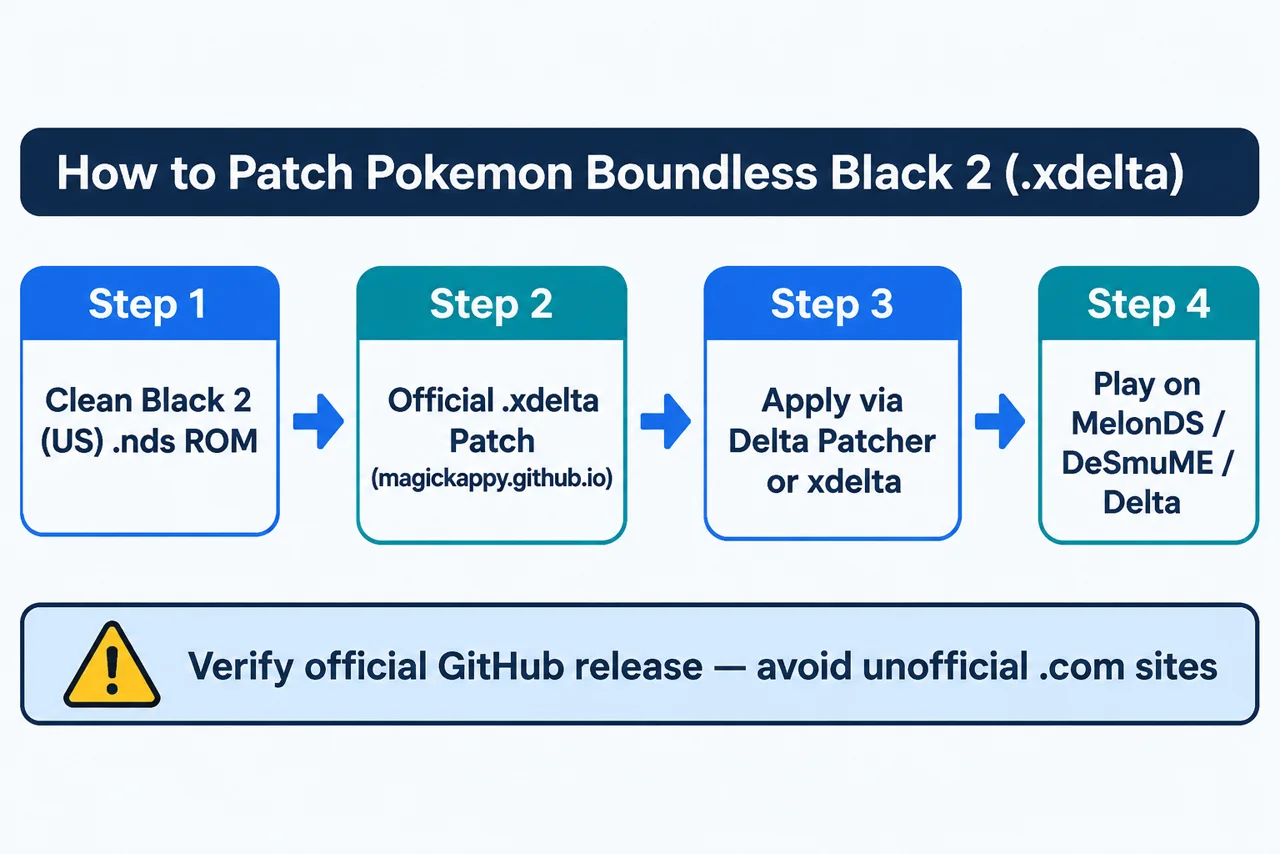
Step-by-Step xdelta Patching Walkthrough
Follow these four steps in order to build a playable .nds file without checksum errors:
- Obtain a clean base ROM: Use your own legally dumped, unmodified 512 MB Pokémon Black 2
.ndsfile. Hacks built onWhite2UpgradeandPW2Coderequire an unencrypted, untrimmed base ROM matching the exact official checksums (CRC32: D4427FD1, SHA-1:e51e6dfb8678a3d19dcd2a10691b96a569ca0abb). - Patch online or grab the official
.xdeltafile: Open magickappy.github.io/boundless-black-2/download/ to use the built-in client-side RomPatcher JS tool (recommended on Chrome, Firefox, or Edge; your ROM never uploads) or downloadboundless-black-2-v1.0.1.xdelta(66 MB) directly for desktop/mobile patchers. - Select source and patch in Delta Patcher (if patching offline): Open Delta Patcher (or MultiPatch on macOS / UniPatcher on Android). Set Original file to your clean Pokémon Black 2
.ndsROM, and set XDelta patch toboundless-black-2-v1.0.1.xdelta. Keep checksum validation enabled so mismatched base dumps fail safely. - Apply patch and verify output: Click Apply patch to produce
Boundless Black 2 v1.0.1.nds(expected output SHA-256:b27d2cc53f9be10ade6bd651837d7ded6a383be91cdb871a01628ef2fc884c83). Load the patched.ndsfile in MelonDS, DeSmuME, or Delta.
Emulator Compatibility and Recommended Settings
| Platform | Recommended Emulator | Key Configuration Notes |
|---|---|---|
| Windows / Linux | MelonDS (Desktop) | Best Gen V timing accuracy, DSi/NDS BIOS support, smooth fast-forward, reliable save SRAM/DSV handling |
| macOS | MelonDS or OpenEmu | Standalone MelonDS receives C-injection compatibility fixes faster than older bundled cores |
| iOS / iPadOS | Delta (App Store) | Uses MelonDS core; requires standard NDS BIOS files imported once inside Delta settings |
| Android | MelonDS Android or DraStic | Standard NDS save handling works out of the box; avoid legacy cheat databases that conflict with expanded Dex tables |
Common Patching Errors and Fixes
| Symptom / Error | Likely Cause | Recommended Fix |
|---|---|---|
XD3_INVALID_INPUT checksum mismatch |
Base ROM does not match CRC32: D4427FD1 / SHA-1 e51e6dfb8678a3d19dcd2a10691b96a569ca0abb (wrong region, trimmed, or pre-patched) |
Re-dump an unmodified 512 MB *Pokémon Black 2* `.nds` ROM matching those checksums and re-apply boundless-black-2-v1.0.1.xdelta |
| White screen on boot | Missing BIOS/firmware in MelonDS or corrupted patch extraction | Verify NDS BIOS paths in MelonDS settings or re-extract the `.xdelta` archive cleanly |
| Save file missing after hotfix | Patched `.nds` filename changed without renaming `.sav` / `.dsv` | Match your old save filename exactly to the newly patched `.nds` filename inside your emulator's saves folder |
For details on keeping saves safe across future hotfixes, check our Updates & Patch Log, or head to the 1,025 Pokédex & DexNav Guide once your game boots.
Frequently Asked Questions
Can I play Boundless Black 2 on iOS using Delta Emulator?
Yes. On iPhone and iPad, install Delta from the App Store, import the required Nintendo DS BIOS files in Delta's settings, patch your clean Black 2 ROM into BoundlessBlack2.nds, and import that .nds file into Delta.
Why does Delta Patcher show XD3_INVALID_INPUT?
XD3_INVALID_INPUT means the base ROM does not match the required checksum (CRC32 D4427FD1)—most often because the base file is trimmed, pre-patched, European, or Pokémon White 2 instead of an unmodified 512 MB Pokémon Black 2 dump.
Should I apply hotfix patches on top of an already patched Boundless Black 2 ROM?
No. Always apply the new .xdelta patch to your original clean Black 2 .nds ROM (never patch an already-patched Boundless Black 2 ROM), then rename your .sav or .dsv file to match the new .nds filename.
Is MelonDS or DeSmuME better for Boundless Black 2?
MelonDS is the primary recommendation for PC and mobile because of its accurate Gen V memory timing and save stability, while DeSmuME and Delta also run the hack.
How do I tell the official download from fake sites?
The only official download and documentation hub is magickappy.github.io/boundless-black-2/ (plus hotfix links in the official Discord). Avoid unofficial .com sites offering pre-patched ROMs or .exe installers.
Player Notes (0)
Leave a comment (0 comments)